

Why my recent sales popups are not showing?
If your recent sales popup isn't showing, open your Popify dashboard and look for a warning message next to the popup. The most common cause is that your store has no orders from the last 60 days: the popup stays hidden until a new order is placed. If there is no warning, check your store in an incognito window.
How do I check for a warning?
Log in to your Popify dashboard.
Find your popup and check whether there is a warning message next to it.
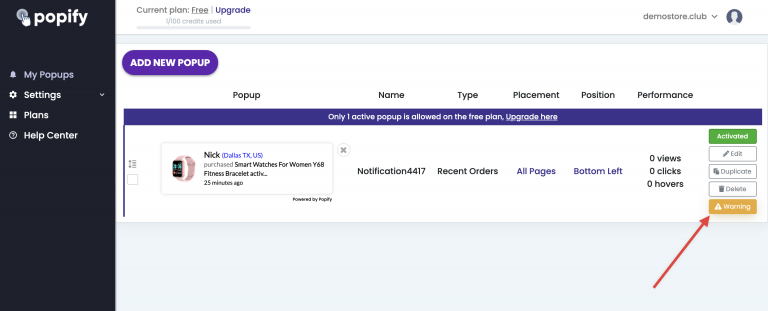
If a warning appears, click it to see the issue.
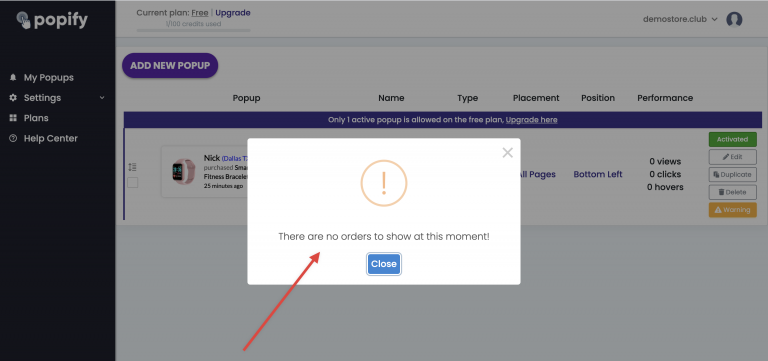
What if my store has no orders from the last 60 days?
If your store has no orders from the last 60 days, the warning appears and the popup won't show until new orders are placed. In the meantime, you can use add-to-cart popup events instead, or other popup types. See Why am I getting a warning message? for other reasons an order can be skipped.
What if there is no warning?
Open your store in a new incognito tab and check whether the popup appears there. If it still doesn't, see Why don't I see my popup notifications?
Why does my popup show a deleted product?
Popify does not show deleted products or products that are hidden from your online store channel. If you still see one, clear your browser cache and local storage, or open your store in an incognito window.
Still can't see your popups? Contact us.