

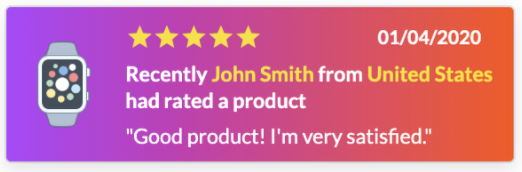
How to create a review popup notification using Popify and Ryviu?
To create a review popup with Popify and Ryviu, click New Notification in the Popify dashboard, choose Reviews from the notification type list, and select Ryviu as the platform. Then choose the pages and position, click Next, adjust the design or pick a template, and click Launch.
Before you start
Ryviu must be installed on your store with some reviews imported. Popify shows the reviews already in your Ryviu account.
Create a Ryviu review popup
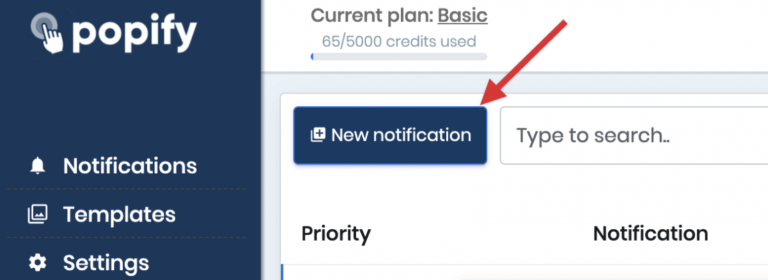
1) From the Popify dashboard, click New Notification:
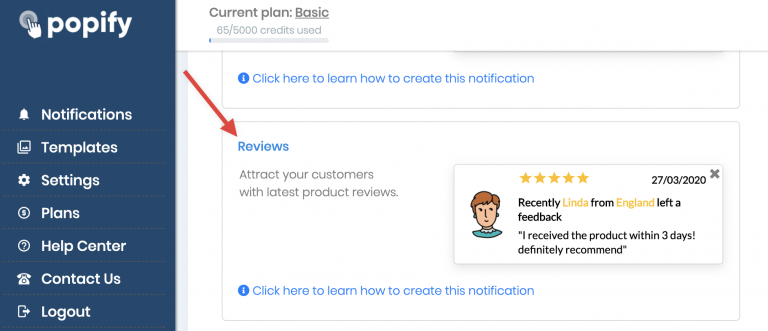
2) Scroll down and select Reviews from the notification type list:
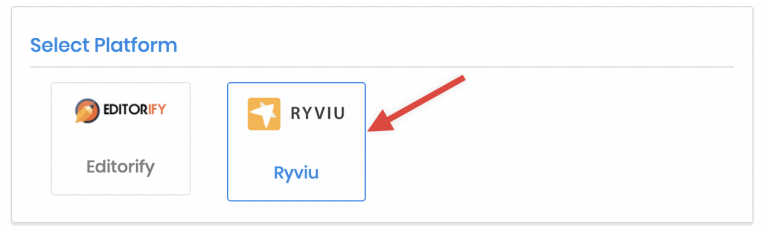
3) Select Ryviu in the platform section:
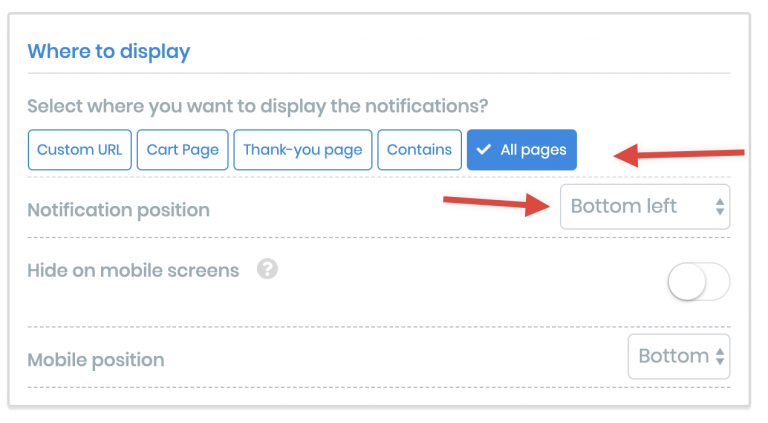
4) Choose the pages that show the popup and its position:
5) Click Next.
6) Change the design of your popup manually or select a template.
7) Click Launch.
Popify supports Editorify as well as Ryviu. For the general steps and how often reviews refresh, see how to create a reviews notification with Popify.
Video guide
How to create a review popup notification using Popify and Ryviu?